Renewing an expired Pakistani ID card while living abroad used to mean embassy visits, long waits, and paperwork. In 2026, the official Pak Identity mobile application by National Database and Registration Authority (NADRA) allows most overseas Pakistanis to complete the entire renewal process online — from application to payment and tracking — without traveling to Pakistan.
This long-form guide explains everything you need to know to renew your CNIC or NICOP from abroad using the Pak Identity app, with clear steps, requirements, timelines, and expert tips to avoid delays.
What Is the Pak Identity App?
Pak Identity is NADRA’s official digital platform that allows Pakistani citizens, especially overseas Pakistanis, to apply for and renew identity documents online. Through the app, applicants can:
- Renew expired CNIC or NICOP
- Upload documents digitally
- Capture live biometrics using a smartphone
- Pay fees online
- Track application status
- Receive ID cards abroad via courier or embassy collection
CNIC vs NICOP: Which Card Should Overseas Pakistanis Renew?
Understanding the difference is essential before applying:
CNIC (Computerized National Identity Card)
- Intended for residents of Pakistan
- Limited overseas renewal support
- Usually requires Pakistan residency
NICOP (National Identity Card for Overseas Pakistanis)
- Specifically designed for Pakistanis living abroad
- Fully supported via Pak Identity app
- Accepted for travel, banking, property, and legal matters
Most overseas Pakistanis should renew NICOP, even if they previously held a CNIC.
Lost CNIC in Pakistan? How to Apply for a New CNIC Via Pak Identity App (Beginner’s Guide)
Requirements to Renew an Expired CNIC or NICOP Abroad (2026)
Before starting, prepare the following:
- Expired CNIC or NICOP
- Valid Pakistani passport
- Proof of overseas residence (visa, residence permit, utility bill, or bank statement)
- Recent passport-style photograph
- Marriage certificate or legal documents (if name or marital status changed)
Tip: All information must exactly match your passport to avoid verification delays.
Step-by-Step Guide: Renewing Your ID Card Using Pak Identity App
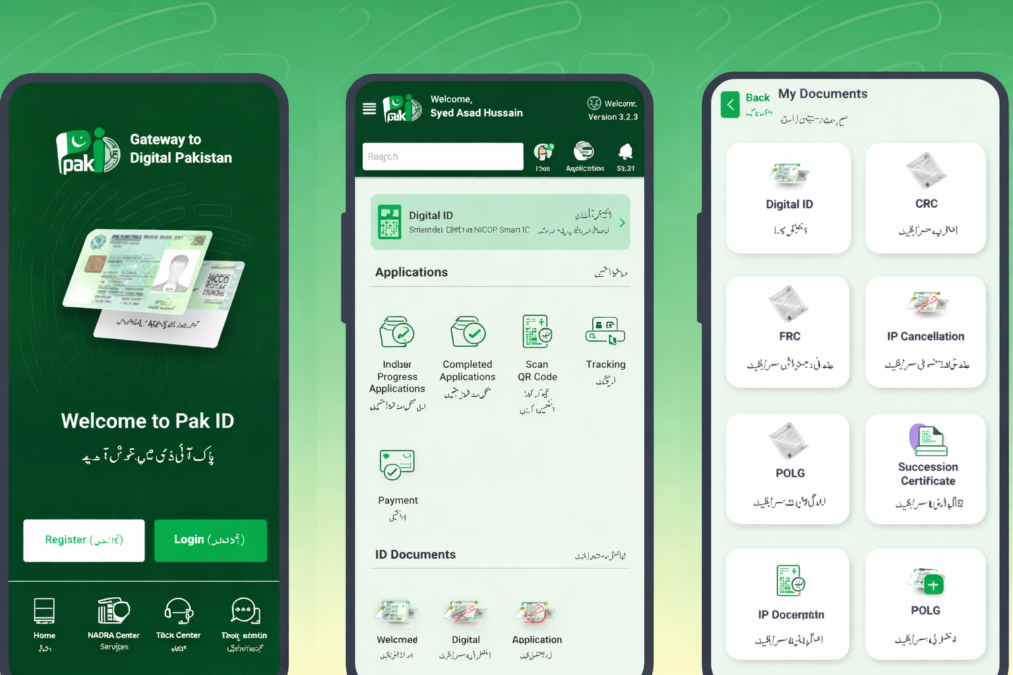
Step 1: Download and Install the Pak Identity App
- Available on Google Play Store and Apple App Store
- Ensure the developer is listed as NADRA
Step 2: Create an Account or Log In
- Register using your email and mobile number
- Complete identity verification
- Existing users can log in directly
Step 3: Select the Renewal Service
From the main dashboard, choose:
- Renew CNIC or
- Renew NICOP (recommended for overseas Pakistanis)
Then select:
- Renewal (no modification) or
- Renewal with modification (name, marital status, etc.)
Step 4: Fill in Application Details
- Enter personal details exactly as per passport
- Upload clear images of required documents
- Review all entries carefully before proceeding
Step 5: Capture Live Biometrics
Using your smartphone:
- Take a live facial photograph
- Add a digital signature
- Capture fingerprints (if required)
In rare cases where biometrics cannot be captured remotely, the app will guide you to visit the nearest Pakistani embassy or consulate.
Step 6: Submit Application and Pay Fees
- Review your application
- Submit and proceed to payment
- Fees vary by service type and priority (Normal / Urgent / Executive)
Typical app-based renewal fees start from low USD amounts, but always confirm the final amount shown in the app before payment.
Step 7: Track Application Status
After submission:
- Receive a tracking number
- Monitor progress inside the app
- Status updates include:
Received → Processing → Printed → Dispatched
Step 8: Receive Your Renewed ID Card Abroad
Delivery options depend on your location:
- Courier delivery to overseas address
- Collection from Pakistani embassy or mission
Processing times vary by priority:
- Executive: fastest
- Urgent: moderate
- Normal: standard timeline
How to Make First CNIC on Pak Identity App – Complete Step-by-Step Guide for Pakistan
Common Mistakes That Cause Delays (and How to Avoid Them)
- Mismatched name or date of birth
- Blurry or cropped document photos
- Selecting modification without legal proof
- Expired passport
- Incorrect overseas address
Always double-check details before submission.
Frequently Asked Questions (FAQs)
Can I renew my expired NICOP entirely online in 2026?
Yes. In most countries, the full renewal process can be completed online using the Pak Identity app.
How long does NICOP renewal take?
It depends on the selected priority. Executive services are fastest, while normal services take longer.
Is embassy visit required?
Usually no. Embassy visits are only required if biometric capture fails or for special cases.
Can I renew before my ID expires?
Yes. NADRA allows early renewal, typically up to 6 months before expiry.
Is Pak Identity safe and official?
Yes. It is the official digital platform of NADRA.
Final Checklist Before Applying
- Passport valid
- Documents scanned clearly
- Correct service selected
- Address updated
- Payment method ready
Conclusion
In 2026, renewing an expired Pakistani ID card while living abroad is simpler than ever. With the Pak Identity app, overseas Pakistanis can avoid unnecessary travel, save time, and complete the entire CNIC or NICOP renewal process digitally. By following the steps in this guide and avoiding common mistakes, you can ensure a smooth, hassle-free renewal experience.