Renewing your LTV or HTV driving license online in Punjab, Pakistan is now very simple thanks to the official DLIMS Punjab portal. Instead of visiting a licensing center and waiting in long lines, you can now complete the entire renewal process from home.
In this step-by-step guide, you will learn how to renew your LTV or HTV driving license online using the DLIMS website, what documents you need, and how much the renewal fee is.
What is DLIMS Punjab?
DLIMS (Driving License Issuance Management System) is the official online platform launched by the Punjab Government. It allows citizens to access driving license services online.
Using DLIMS, you can:
- Renew your driving license
- Verify license details
- Apply for a duplicate license
- Check driving license status
The official website is:
E Challan Online Check in Punjab Pakistan – Complete Guide 2026
Step-by-Step Guide to Renew LTV or HTV Driving License Online
Follow these simple steps to renew your license online.
Step 1: Visit the Official DLIMS Website
Open the official DLIMS portal in your browser:
Create an account or log in to your existing account.
Once logged in, go to the License section.
Step 2: Select License Renewal
After logging into the portal:
- Click License
- Choose Renewal of License
- A renewal form will appear
You will need to enter the following details:
- CNIC number
- Driving license number
- License issuance date
Then click Submit to continue.
Check Traffic Challan Online by Vehicle Number – Sindh Police E-Challan Karachi
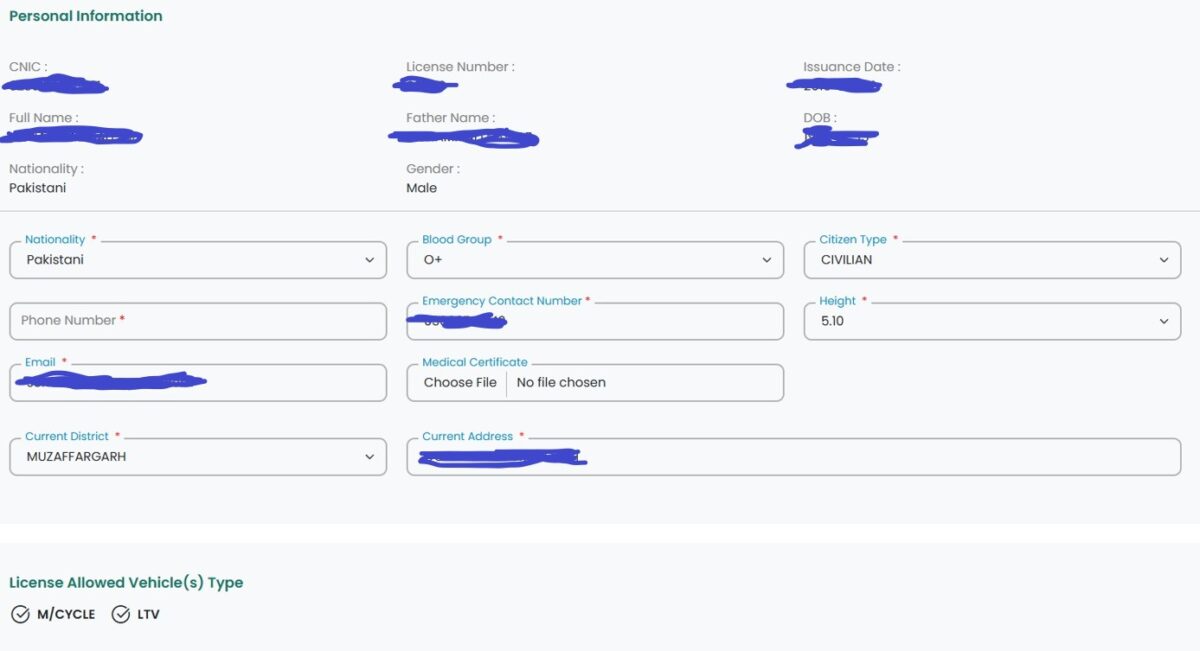
Step 3: Verify Your Personal Information
After submitting your details, the system will automatically retrieve your information from the database.
You will see:
- Your name
- Father’s name
- Date of birth
- License number
- Vehicle category (LTV / HTV / Motorcycle)
Check that all the information is correct before moving to the next step.
If any information is incorrect, you should contact the nearest driving license center.
Step 4: Upload Required Documents
Next, you will need to upload the required documents.
Required documents include:
- Passport size photograph
- Driving license (front side)
- Driving license (back side)
- CNIC front side
- CNIC back side
Make sure:
- Images are clear
- Face is visible in photo
- Background is white
- File size meets the website requirements
Step 5: Check License Category
The system will show the vehicle categories allowed on your license.
These may include:
- Motorcycle
- LTV (Light Transport Vehicle)
- HTV (Heavy Transport Vehicle)
You do not need to manually select LTV or HTV. The system automatically detects the categories already approved on your license.
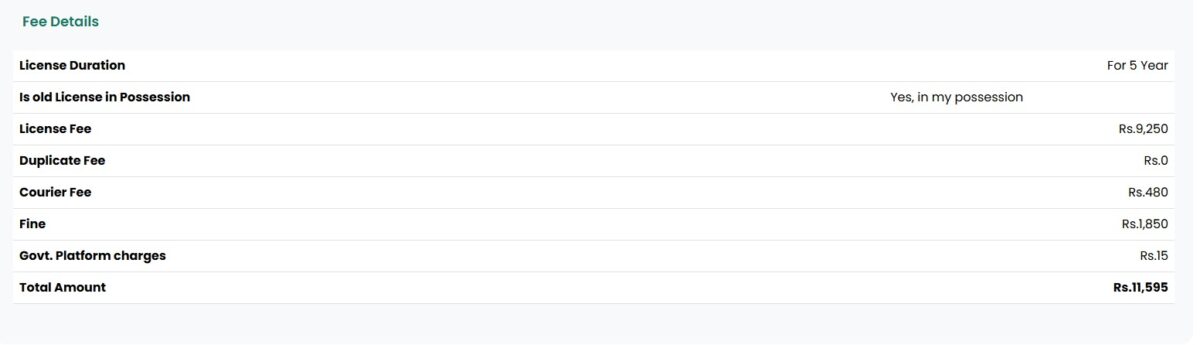
Step 6: Review Renewal Fee
Before submitting the application, the system will display the fee details.
Typical charges include:
- License renewal fee
- Courier delivery charges
- Government platform charges
- Late renewal fine (if applicable)
The total amount will appear before payment.
Step 7: Submit the Application
Once everything is verified:
- Confirm the declaration checkbox
- Click Submit
Your renewal application will be submitted successfully.
Step 8: Make Online Payment
After submission, the system will generate a payment slip or an online payment option.
You can pay using:
- Online banking
- Mobile banking
- ATM
- Bank payment
Once the payment is confirmed, your application will move to the processing stage.
DLS Online Sindh Police – Guide for Check, Apply, Renewal & Tracking
Step 9: Receive Your Renewed Driving License
After successful processing, your renewed driving license will be issued.
In many cases, the license card is delivered to your home through a courier service.
Processing time may take a few days, depending on the workload of the licensing authority.
Important Tips for License Renewal
To avoid issues during the process, keep these tips in mind:
Use the official DLIMS website only
Upload clear images of documents
Double-check CNIC and license number
Do not share personal details with unknown callers
Frequently Asked Questions (FAQs)
Can I renew my LTV license online in Pakistan?
Yes, you can renew your LTV license online through the DLIMS Punjab portal.
Can HTV driving licenses also be renewed online?
Yes. If your license includes the HTV category, it can be renewed online through the same process.
What documents are required for license renewal?
You need:
- CNIC
- Driving license
- Passport size photo
How long does license renewal take?
Usually a few days after successful payment and verification.
Final Words
Renewing your LTV or HTV driving license online in Punjab is now quick and convenient with the DLIMS system. By following the steps above, you can complete the process easily without visiting a licensing office.
Always make sure you use the official government portal and keep your documents ready before starting the application.